
Proxy Knowledge
Guide to Integrating Proxies into Playwright Node.js for Web Scraping to Bypass Cloudflare Restrictions

Table of contents
Introduction to Modern Web Scraping Challenges
In the digital era, data serves as an invaluable resource for market research, competitor analysis, and developing artificial intelligence systems. However, automated data collection (web scraping) has become more difficult than ever. Leading Web Application Firewall (WAF) platforms such as Cloudflare, Akamai, or Imperva have deployed highly sophisticated protective barriers to detect and block automated bots.
Among these, Cloudflare is the most common barrier developers face. With mechanisms like browser fingerprinting, user behavior analysis, IP address checking, and JavaScript/CAPTCHA challenges (Cloudflare Turnstile), Cloudflare can easily block standard data collection requests. To solve this problem, combining the browser automation tool Playwright Node.js with a specialized web scraping proxy solution is currently the most effective and comprehensive approach.
Why Does Cloudflare Detect Data Scraping Bots?
 Cloudflare evaluates incoming web requests across multiple layers, including IP reputation, TLS fingerprinting, and browser attributes.
To build an effective bypass solution, we first need to clearly understand the methods Cloudflare uses to identify automated access requests:
- IP Reputation Control: Cloudflare possesses a massive database of IP addresses. If an IP sends too many requests in a short time or belongs to a datacenter IP range, that IP will be blacklisted or forced to pass CAPTCHA challenges.
- TLS/JA3 Fingerprinting: Standard HTTP libraries in Node.js (such as Axios, Fetch) perform TLS handshakes differently compared to real browsers. Cloudflare uses TLS fingerprinting to detect this anomaly directly at the network layer.
- Browser Features and Navigator Attributes: Automation tools like Puppeteer or Playwright, if not configured cleverly, will expose attributes like navigator.webdriver = true, missing fonts, or unusual WebGL configurations.
- Behavioral Analysis: Page scrolling speed, mouse movements, and time intervals between clicks do not resemble human behavior.
Properly using a playwright proxy solution completely resolves the IP address problem, and when combined with Playwright's realistic browser emulation capabilities, you can easily bypass Cloudflare's complex inspection layers.
Environment Setup and Playwright Node.js Configuration
Before diving into proxy integration techniques, you need to set up your Node.js development environment and install the Playwright library. Unlike older tools, Playwright offers superior performance, multi-browser support (Chromium, Firefox, WebKit), and built-in proxy management at the context level (BrowserContext).
To start a new project, initialize a Node.js project and install the necessary packages:
npm init -y
npm install playwright
Choosing the Right Proxy Type for Cloudflare Scraping
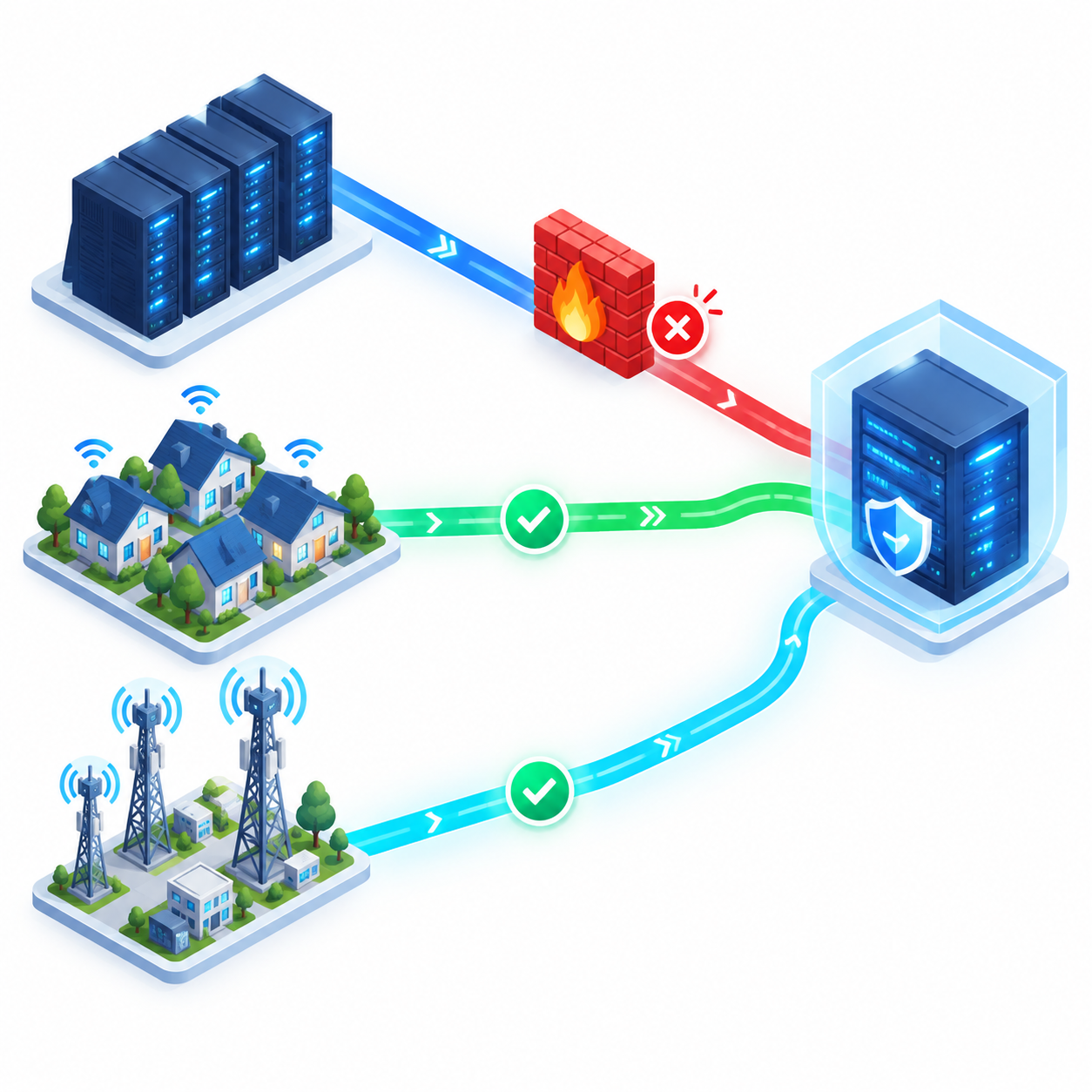 Comparing proxy types: Residential and mobile proxies provide significantly higher trust scores than datacenter proxies when facing WAF barriers.
Not all proxy types are effective against Cloudflare. Choosing the right proxy type accounts for 80% of your data scraping campaign's success:
- Datacenter Proxies: Low cost and high speed, but IP ranges are easily detected and bulk-blocked by Cloudflare. Use them only for websites without strict WAF systems.
- Residential Proxies: IP addresses assigned by actual Internet Service Providers (ISPs). This is the optimal choice for cloudflare scraping because Cloudflare avoids blocking legitimate residential IPs to prevent impacting real users.
- Mobile Proxies: IP addresses from 3G/4G/5G networks. Highest trust score but expensive. Typically used for extremely difficult tasks.
Basic Proxy Integration Guide in Playwright Node.js
Playwright supports proxy configuration systematically via browser launch options or browser context. Here is how to integrate proxies in Node.js into a simple Playwright script.
1. Integrating Unauthenticated Proxies
For public proxies or proxies authenticated via static IP (IP Whitelist), you only need to pass the server parameter into the launch method:
const { chromium } = require('playwright');
(async () => {
const browser = await chromium.launch({
proxy: {
server: 'http://103.45.67.89:8080'
},
headless: false
});
const context = await browser.newContext();
const page = await context.newPage();
await page.goto('https://nowsecure.nl');
await browser.close();
})();
2. Integrating Authenticated Proxies (Username & Password)
Most high-quality Residential Proxy providers require authentication with a username and password. Playwright supports this seamlessly without requiring external extensions:
const { chromium } = require('playwright');
(async () => {
const browser = await chromium.launch({
proxy: {
server: 'http://proxy.example.com:8000',
username: 'your_username',
password: 'your_password'
}
});
const context = await browser.newContext();
const page = await context.newPage();
await page.goto('https://httpbin.org/ip');
const content = await page.textContent('body');
console.log('Current IP:', content);
await browser.close();
})();
Advanced Proxy Rotation (Playwright Proxy Rotation) Techniques
If you make thousands of requests from the same IP address, Cloudflare will quickly detect the abnormal frequency and trigger security barriers. To resolve this issue, implementing playwright proxy rotation techniques is mandatory.
Method 1: Using Auto-Rotating Proxy Services
Professional proxy providers (such as Bright Data, Oxylabs, Smartproxy) offer endpoints that automatically rotate IPs after each HTTP request or after a set period. This is the simplest and most effective solution because the IP rotation logic is handled entirely on the proxy server side.
You simply connect to a single port or use a session ID parameter in the username to request a new IP for each request.
Method 2: Implementing Proxy List Rotation Logic in Node.js
If you own a list of multiple distinct proxy IP addresses, you can actively rotate proxies by creating new BrowserContext instances for each scraping session. In Playwright, each BrowserContext acts as an isolated browser session complete with independent cookies, cache, and network configurations.
Here is an example implementation of context-based proxy rotation:
const { chromium } = require('playwright');
const proxyList = [
{ server: 'http://proxy1.com:8000', username: 'user1', password: 'pass1' },
{ server: 'http://proxy2.com:8000', username: 'user2', password: 'pass2' },
{ server: 'http://proxy3.com:8000', username: 'user3', password: 'pass3' }
];
function getRandomProxy() {
const index = Math.floor(Math.random() * proxyList.length);
return proxyList[index];
}
(async () => {
const browser = await chromium.launch({ headless: true });
for (let i = 0; i < 5; i++) {
const selectedProxy = getRandomProxy();
console.log(`Using proxy: ${selectedProxy.server}`);
// Initialize context with a specific proxy
const context = await browser.newContext({
proxy: selectedProxy
});
const page = await context.newPage();
try {
await page.goto('https://api.ipify.org?format=json', { waitUntil: 'networkidle' });
const ipData = await page.textContent('body');
console.log(`Result iteration ${i + 1}:`, ipData);
} catch (error) {
console.error(`Error scraping with proxy ${selectedProxy.server}:`, error.message);
} flow {
await context.close(); // Close context to free resources
}
}
await browser.close();
})();
Optimizing Scripts to Bypass Cloudflare Turnstile and CAPTCHA
 Synchronizing browser fingerprint attributes like locale, timezone, and geolocation with your proxy IP address is critical for stealth operation.
Using playwright proxy alone is not enough to bypass the latest versions of Cloudflare. Cloudflare combines browser fingerprint analysis with the IP address. If your IP is in the US but your User-Agent or Timezone indicates Vietnam, the system will immediately flag the request as suspicious.
1. Using Stealth Libraries (playwright-extra)
The playwright-extra library combined with the puppeteer-extra-plugin-stealth plugin helps conceal automated browser fingerprints (such as removing navigator.webdriver, mocking Chrome Runtime, and adding default plugins).
Install the supporting packages:
npm install playwright-extra puppeteer-extra-plugin-stealth
Apply it in Node.js source code:
const { chromium } = require('playwright-extra');
const stealth = require('puppeteer-extra-plugin-stealth')();
chromium.use(stealth);
(async () => {
const browser = await chromium.launch({
headless: false, // Set to false or use new headless mode when bypassing Cloudflare
proxy: { server: 'http://your-residential-proxy.com:8000' }
});
const page = await browser.newPage();
await page.goto('https://target-website-with-cloudflare.com');
// Handle scraping logic here
})();
2. Synchronizing Browser Fingerprints with Proxy IP Addresses
When using a web scraping proxy, you must ensure that attributes like Locale, Timezone, and Geolocation perfectly match the country of that proxy IP:
const context = await browser.newContext({
proxy: { server: 'http://us-proxy.example.com:8000' },
locale: 'en-US',
timezoneId: 'America/New_York',
geolocation: { longitude: -74.006, latitude: 40.7128 },
permissions: ['geolocation'],
userAgent: 'Mozilla/5.0 (Windows NT 10.0; Win64; x64) AppleWebKit/537.36 (KHTML, like Gecko) Chrome/122.0.0.0 Safari/537.36'
});
Best Practices for Large-Scale Data Scraping
To ensure your data collection system operates stably, maintains high performance, and avoids mass IP bans, follow these golden rules:
- Rate Limiting: Never send hundreds of consecutive requests within a few seconds from the same proxy. Add random delays between click operations or page navigations.
- Error Handling and Retry Mechanism: When a proxy is detected by Cloudflare or connection times out, the system should automatically catch errors, mark the bad proxy, and retry the request using a new proxy from the list.
- Use New Headless Mode: Starting from recent Chromium releases, the --headless=new flag provides much better anonymity compared to the legacy headless mode, significantly reducing detection rates.
- Success Rate Monitoring: Set up a logging system to track the ratio of 200 OK responses versus 403 Forbidden or 539 (Cloudflare Block) responses. This allows you to evaluate the quality of your proxy pool in real time.
Conclusion
The process of cloudflare scraping requires a seamless combination of sophisticated browser emulation and smart IP infrastructure management. By integrating proxies in Node.js with Playwright and flexibly applying playwright proxy rotation techniques, you can build a powerful, stable automated web scraping system that bypasses all technical barriers imposed by Cloudflare.
Always ensure compliance with legal regulations and the terms of service of the target website, and conduct your data collection activities responsibly.
Related articles
Ready for real proxies, not just the guide?
Buy Residential, ISP, Datacenter, or Mobile proxies — live in minutes.
View products