
Hướng Dẫn Sử Dụng
Guide to Configuring Automatic Rotating Proxy Pool and Failover in Puppeteer Using puppeteer-cluster

Table of contents
The Importance of Proxy Pools and Failover Mechanisms in Web Scraping
When deploying large-scale data collection systems using Puppeteer, relying on a single network address often leads to connection interruptions or rate-limiting by the target server. To maintain the continuity and stability of your workflow, an essential solution is integrating a dedicated proxy pool puppeteer infrastructure.
This infrastructure not only rotates connection addresses for each task but also requires a self-healing mechanism, also known as proxy failover web scraping. When an intermediary address encounters issues, responds slowly, or stops working entirely, the system must automatically detect it, eliminate the faulty agent, and retry the request using another address to ensure the integrity of the collected data.
Overview of the puppeteer-cluster Library
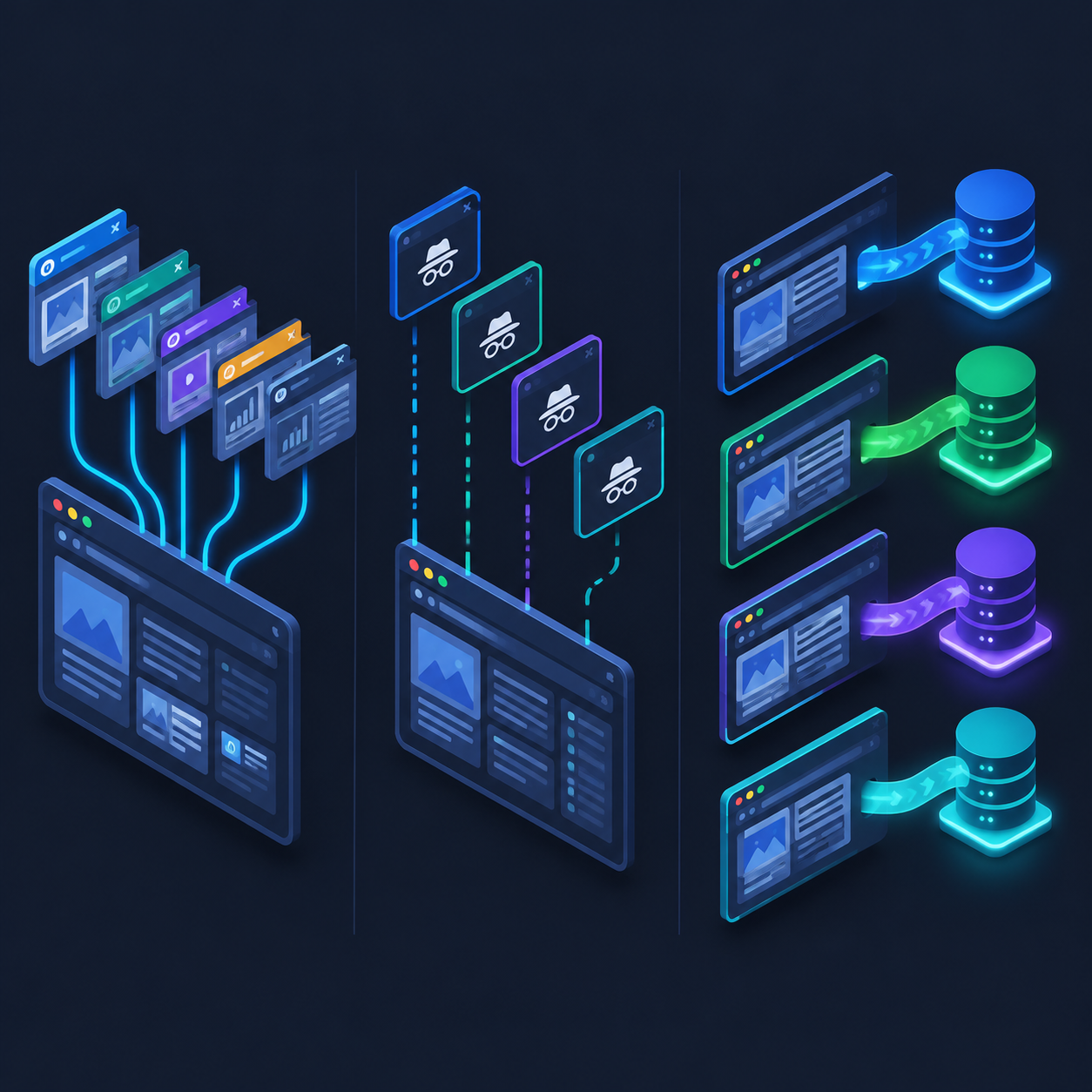
Puppeteer is a powerful tool for controlling headless browsers, but managing the lifecycle of multiple processes simultaneously consumes a significant amount of hardware resources. The puppeteer-cluster library was created to solve this orchestration problem, allowing concurrent work distribution through flexible session management models.
This library provides primary processing modes including:
- Cluster.CONCURRENCY_PAGE: Shares a single browser process and branches out across tabs. This mode saves resources but does not allow configuring distinct network parameters at the process level.
- Cluster.CONCURRENCY_CONTEXT: Leverages incognito contexts within the same browser. This method supports isolating cookies and sessions, but limitations regarding network startup parameters remain.
- Cluster.CONCURRENCY_BROWSER: Spawns an independent browser process for each task. This is the optimal model for integrating a puppeteer-cluster proxy because it allows applying distinct proxy server parameters right from the browser launch phase.
Designing a Proxy Pool Architecture for puppeteer-cluster
To build a cấu hình proxy xoay vòng puppeteer (rotating proxy configuration for Puppeteer) system capable of fault tolerance, the program structure should be decoupled into two main components: the Proxy Pool Manager layer and the Cluster Runner orchestration layer.
1. Designing a Flexible Proxy Pool Manager
The address list manager needs to maintain the operational status of each connection endpoint, support round-robin rotation, and record network errors to temporarily isolate unresponsive addresses.
Crucial attributes of a professional Proxy Manager class include an available address list, a rotation queue, a temporary blacklist, and a consecutive failure counter.
2. Choosing the Right Execution Mode in puppeteer-cluster
Because Chromium network flags typically require configuration at process launch time, using the independent browser execution mode is mandatory to change connection addresses for each separate session without affecting other concurrent tasks.
Step-by-Step Implementation Guide
Below is a detailed programming approach to building a comprehensive request distribution and failover solution.
Step 1: Installing Dependencies
The system requires the runtime environment and automation control libraries to be installed:
Install the puppeteer and puppeteer-cluster libraries using your system's package manager to begin setting up the source code.
Step 2: Building the Proxy Orchestrator and Error Handler Class
This class is responsible for allocating proxy servers to each task and receiving feedback on connection health:
- Rotation Algorithm: Dequeue the head of the list, use it for the task, and push it to the end of the list if the connection remains stable.
- Mark Failed: When a task encounters a timeout or connection drop, that access point is moved to a verification queue or temporarily removed from rotation.
- Periodic Recovery: Provide a mechanism to automatically return recovered addresses back to the active pool after a specific cooldown interval.
Step 3: Integrating the Proxy into the Cluster Initialization Workflow
When instantiating the Cluster object, you must intervene in the browser launch parameters to assign the corresponding proxy address. Each time a new task is dispatched, the system requests a new connection configuration from the Proxy Manager.
This ensures that every independent process created operates over a distinct network transmission route, distributing risk and enhancing the overall stability of the entire data pipeline.
Step 4: Setting Up the Automatic Failover Mechanism
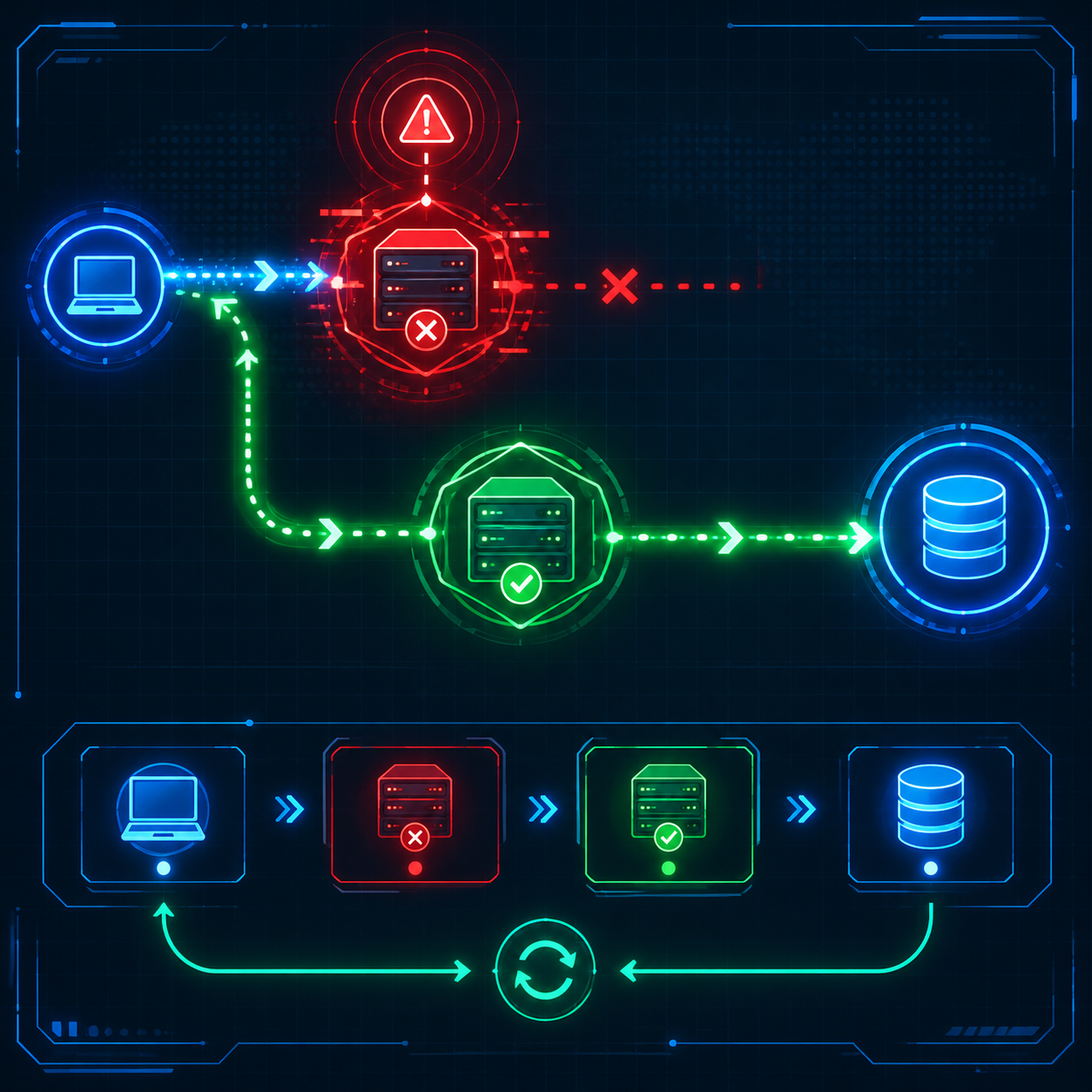
The failover mechanism is triggered when a task's execution block raises an exception related to network infrastructure. The standard handling flow includes:
- Catching errors in the main execution block using exception handling structures.
- Notifying the proxy manager that the current address has encountered an issue.
- Re-queueing the work into the cluster queue to retry with a different address.
- Establishing a maximum retry threshold for each task to avoid infinite loops when all network resources fail.
Handling Proxy Authentication in a Cluster Environment
Professional proxy service providers often require identity authentication via username and password. In this case, simply providing the IP address and service port via command-line flags is not enough.
Inside the task handler function, you must call the page's authentication method to supply the corresponding credentials right after a new page opens. This ensures the session is fully authorized before sending requests to the destination server.
Important Notes for Maintaining System Stability
Operating a large-scale data collection system continuously requires strict engineering control standards:
- Hardware Resource Management: Running multiple browser instances consumes substantial memory and processing power. Closely monitor server capacity to set an appropriate number of concurrent execution threads and prevent resource contention.
- Reasonable Timeouts: Establish strict thresholds for connection and resource loading timeouts. If an endpoint responds too slowly, the system should actively terminate the connection to hand over execution rights to a more viable address.
- Quality Control of the Connection Pool: Periodically prune unresponsive addresses from storage to optimize task queue execution times.
Conclusion
Combining a puppeteer-cluster proxy solution with a rotating management and failover architecture helps build a professional, resilient, and highly scalable data scraping system. By properly orchestrating resources and proactively handling network connection risks, automation tasks will run seamlessly, effectively meeting the demands of complex data processing in production environments.
Related articles
Ready for real proxies, not just the guide?
Buy Residential, ISP, Datacenter, or Mobile proxies — live in minutes.
View products