
Hướng Dẫn Sử Dụng
Monitoring HTTP Proxies with Prometheus Blackbox Exporter and Alertmanager

Table of contents
Why can applications lose connectivity even when the proxy is still running?
A running proxy process does not necessarily mean applications can use the proxy. The service may still be listening on its network port but be unable to access the Internet, encounter authentication errors, or fail to establish a tunnel to an HTTPS destination.
Therefore, HTTP proxy monitoring needs to test the entire request path: from the monitoring host to the proxy, from the proxy to the destination server, and back with a valid response. A simple port check does not fully reflect this experience.
Prometheus Blackbox Exporter performs external probes, Prometheus collects the results, and Alertmanager routes notifications when alert conditions are met. Combined correctly, these components help detect availability failures and track latency trends.
Monitoring architecture and what the results mean
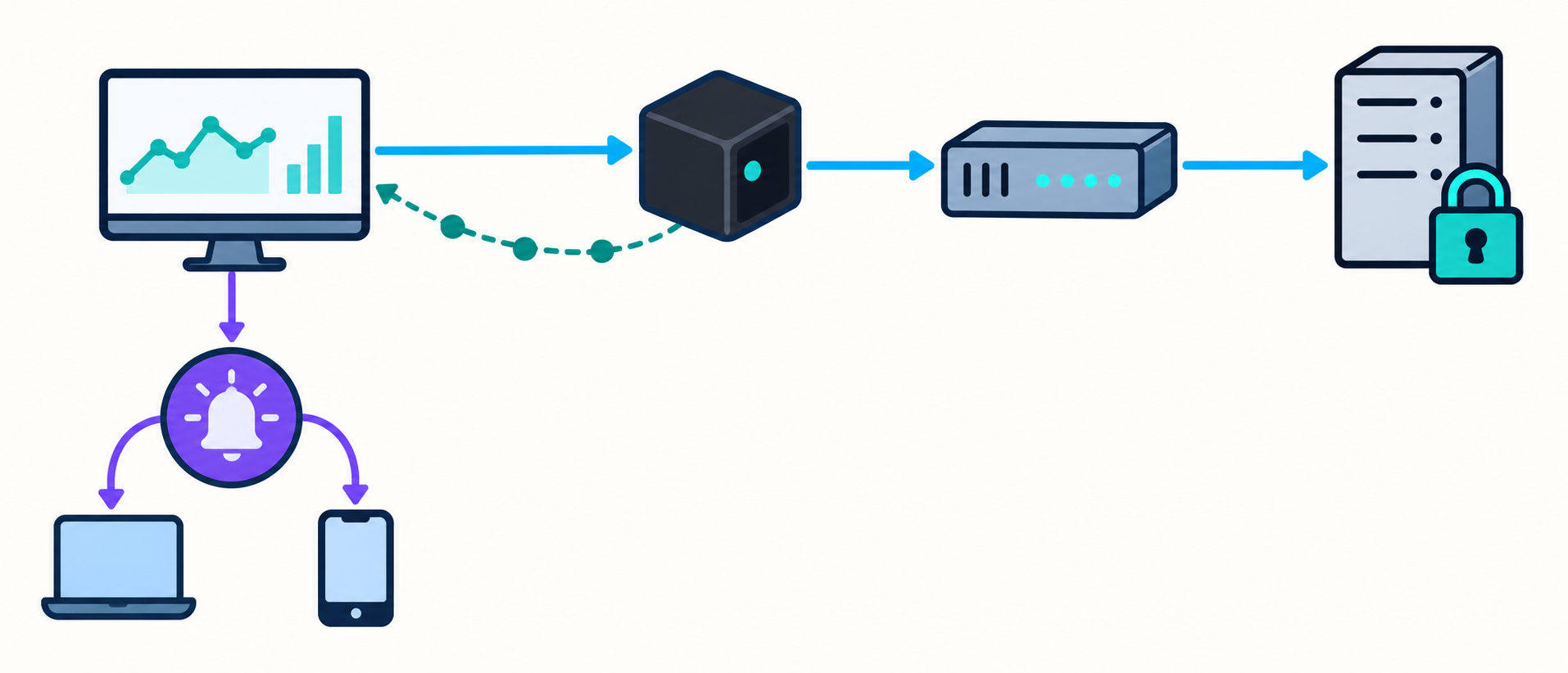
The test flow begins when Prometheus calls the Blackbox Exporter /probe endpoint. The exporter uses a configured HTTP module to send a request to the test URL through the proxy, then returns metrics.
- Blackbox Exporter: performs HTTP requests and evaluates responses.
- Prometheus: stores time series, runs query expressions, and evaluates alerting rules.
- Alertmanager: groups alerts, routes notifications, and handles maintenance silences.
- Test endpoint: provides a stable response to confirm that the path through the proxy is working.
It is important to distinguish proxy uptime checks from process checks. This probe reflects the availability of the entire selected path. When it fails, the cause may lie with the proxy, DNS, the network, or the destination server.
Preparing the endpoint and choosing an exporter location
Choose a test destination you can control
Use an endpoint managed by your organization that returns a simple response and does not depend on interactive login. Avoid homepages with frequent redirects, changing content, or dependencies on numerous backend services.
If applications primarily access HTTPS through an HTTP proxy, use an HTTPS destination. The probe will then include establishing a CONNECT tunnel and a TLS connection to the destination server, more closely matching application behavior.
You can add independent test destinations for comparison. If only one destination fails while the others remain available, investigate a destination-side issue before concluding that the proxy has lost connectivity.
Place the exporter in an appropriate network zone
The exporter should have a network path to the proxy similar to that of the applications being monitored. A successful probe from a management network does not guarantee that applications in the production network can also connect.
Label the network zone or probe location to distinguish results. Also restrict access to the exporter and control outbound traffic, because the probe endpoint can generate requests to specified addresses.
Configuring Prometheus Blackbox Exporter for an HTTP proxy
Create an HTTP module that uses the proxy
In the Blackbox Exporter configuration, define a module with prober: http. Within the http section, set proxy_url to the proxy address, such as http://proxy.internal:3128. This is an example address and must be replaced with your actual details.
Prometheus selects the module through the module parameter. By contrast, the target parameter must be the destination URL to access through the proxy, not the proxy address. Confusing these two addresses can result in a probe that does not test the intended path.
- method: choose a method appropriate for the test endpoint.
- valid_status_codes: specify acceptable response codes if they need to differ from the defaults.
- follow_redirects: determine whether to follow redirects.
- timeout: limit the time allowed to complete the probe.
- fail_if_body_not_matches_regexp: can be used to verify expected content.
If the endpoint returns a dedicated confirmation string, checking the content helps prevent an intermediate error page from being treated as a success. However, avoid matching against content that changes frequently.
Handle authentication credentials and TLS
Distinguish proxy authentication from authentication at the destination server. HTTP authentication fields intended for the destination do not automatically serve as proxy credentials. Check which mechanisms your exporter version supports.
Do not put passwords in Prometheus labels, target URLs, or notification content. If credentials appear in the configuration, restrict read access, manage secrets securely, and avoid storing them in source control.
For HTTPS destinations, keep certificate verification enabled and configure the appropriate CA when using internal certificates. Disabling TLS verification reduces the value of the probe and may conceal errors that applications actually encounter.
Configuring Prometheus to collect probe results
Create a dedicated scrape job, set metrics_path to /probe, and pass the module name in params. The job targets are the test URLs; the exporter address is supplied through relabeling.
A typical relabeling sequence is as follows:
- Copy the original __address__ to __param_target so the exporter receives the destination URL.
- Copy __param_target to instance to identify the destination in the results.
- Overwrite __address__ with the Blackbox Exporter address so Prometheus calls the correct service.
Add stable labels such as proxy_id, environment, and region. When monitoring multiple proxies, you can create corresponding modules and select the module through the job configuration or relabeling. A label describing the proxy does not automatically change the module's proxy_url.
The module timeout must be compatible with scrape_timeout, while leaving time for the exporter to return the results. Choose the scrape interval and the duration for which an alert condition must persist based on operational requirements rather than copying a universal threshold.
Interpreting uptime and latency metrics correctly
Distinguish probe_success from up
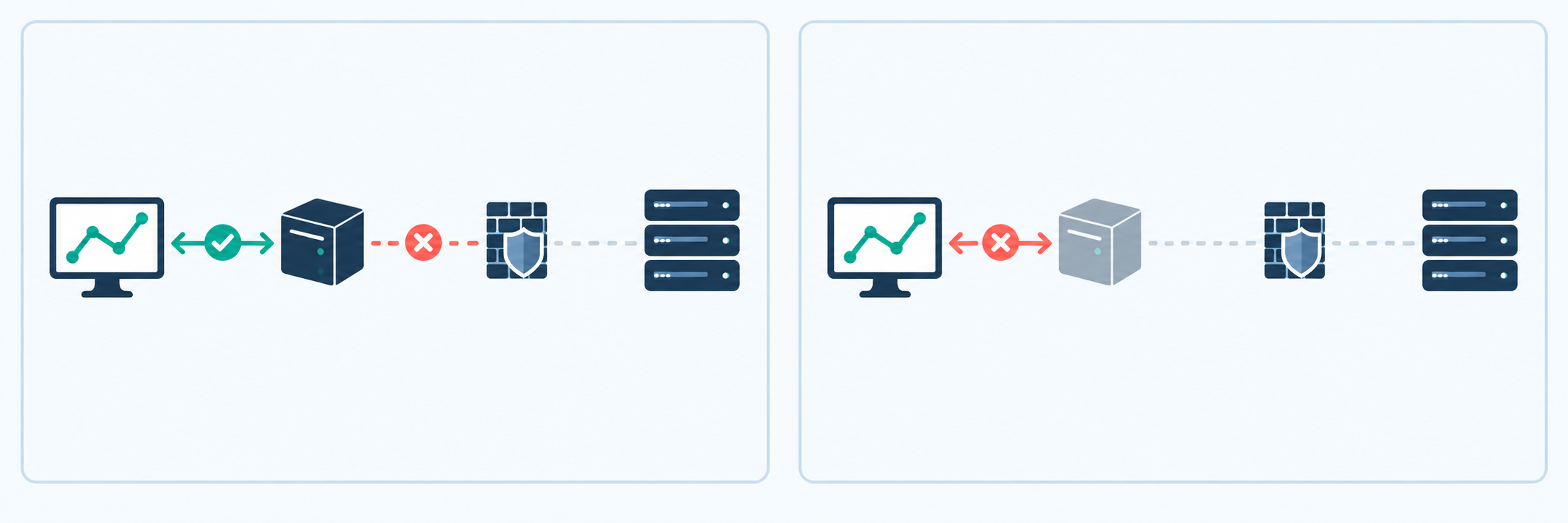
probe_success indicates whether the probe met its success criteria. The expression probe_success{job="blackbox-http-proxy"} == 0 selects failed probes.
Meanwhile, up indicates whether Prometheus successfully scraped the exporter endpoint. The exporter can still return metrics normally even when the request through the proxy fails. Therefore, monitoring only up will miss failures along the path through the proxy.
Understand the limitations of latency measurements
probe_duration_seconds represents the total time taken to execute the probe. It is a useful indicator of how long a request through the proxy takes to complete, but it does not measure the proxy's latency in isolation.
probe_http_duration_seconds provides timings for the HTTP phases recorded by the exporter. When using a proxy, especially with CONNECT, do not assume that each phase corresponds exactly to an independent network component. Consult the implementation and diagnostic logs for the version you are running.
View latency for successful probes separately from failed probes. A quickly rejected request has a low duration, but that does not indicate good service quality. When analyzing trends, always place latency charts alongside success status.
Setting up alerts for proxy connectivity failures
Build alert conditions with a confirmation period
Create an alerting rule based on the expression probe_success{job="blackbox-http-proxy"} == 0. Add the for field to require the failure condition to persist continuously before the alert enters the firing state.
The confirmation period should balance detection speed against tolerance for transient failures. Choose it based on the scrape interval, the proxy's criticality, and actual operational data.
In annotations, accurately state that the probe through the proxy failed rather than asserting that the proxy process has stopped. The notification should include the proxy, environment, test destination, and initial troubleshooting guidance.
Alert on loss of monitoring visibility
Create a separate alert for up{job="blackbox-http-proxy"} == 0. This indicates that Prometheus could not retrieve probe results; it does not directly prove that the proxy is faulty.
If a target is removed from the configuration or service discovery, its time series may disappear rather than change to a failure value. You can use absent or absent_over_time for a known label set; with multiple proxies, compare against an expected proxy inventory to detect each missing proxy.
Routing notifications through Alertmanager

Prometheus evaluates rules and sends alerts to Alertmanager. Alertmanager does not perform probes itself; its role is to group, route, and send notifications to configured receivers.
You can group by alert name, proxy, and environment to retain sufficient context. Route production notifications to the on-call operations team and test environment notifications to a less urgent channel.
- group_wait: waits before sending a group's first notification.
- group_interval: controls update notifications within a group.
- repeat_interval: determines when to repeat notifications for ongoing alerts.
Use silences for planned maintenance and enable recovery notifications if the receiver supports them. Apply inhibition only when dependencies are clear; do not automatically assume that every probe failure is a consequence of an exporter failure.
Testing before deployment
Validate configuration and rule syntax with the appropriate tools before reloading. Then test each scenario in an authorized environment to verify the entire detection and notification chain.
- Block connections from the exporter to the proxy to confirm that the probe fails.
- Test invalid credentials and check that notifications protect secrets.
- Make the test endpoint unavailable to distinguish destination failures from proxy failures.
- Stop the exporter to test alerts for loss of monitoring data.
- Restore the service and confirm that the resolved notification reaches the correct destination.
During diagnosis, you can call the probe with the debug=true parameter to view processing details. Use this only within a controlled scope and review logs for sensitive data before sharing them.
Conclusion
Effective HTTP proxy monitoring combines end-to-end probes, accurate metric interpretation, and a verified alerting process. Prometheus Blackbox Exporter provides data on availability and request duration; Prometheus and Alertmanager turn that data into operational signals.
The most important point is to distinguish failures along the path through the proxy from endpoint failures and monitoring system failures. When the configuration accurately reflects the application's request path, proxy connectivity alerts provide clearer context and support more effective troubleshooting.
Related articles
Ready for real proxies, not just the guide?
Buy Residential, ISP, Datacenter, or Mobile proxies — live in minutes.
View products